
5 Best Power Banks With Digital Display of 2026
Safety: Power banks contain lithium-ion cells. Use the cables the manufacturer supplies or recommends, keep the unit away from heat...
 By GadgetsDiary Editorial Team
Updated November 12, 2026
Safety: Power banks contain lithium-ion cells. Use the cables the manufacturer supplies or recommends, keep the unit away from heat and open flame, follow the temperature range in the manual, and never use a damaged or swollen battery.
The best power banks with a digital display show remaining charge, input and output power and sometimes temperature, so you stop guessing. This guide compares five models from CUKTECH, Anker, Lenovo, UGREEN and Belkin on display type, output, capacity and weight.
A display helps most on high-wattage banks. For the biggest sizes see our best high capacity power banks, and for laptop use see the Laptop Power Banks category.
All Products Compared
| Product | Best For | Capacity | Output | Weight | Display |
|---|---|---|---|---|---|
| CUKTECH 15 Ultra 20,000mAh 140W Power Bank | Best overall | 20,000mAh | 165W total, 140W C1 | 1.3 lb | Smart TFT, temperature warnings |
| Anker 737 24,000mAh 140W Power Bank | Recharge estimates | 24,000mAh | 140W | 1.39 lb | Smart display, recharge time |
| Lenovo 20,000mAh 140W Power Bank | Heat popups | 20,000mAh | 135W total, 140W max | 16 oz | 2.01 inch TFT |
| UGREEN Nexode 20,000mAh 130W Power Bank | Stats-heavy TFT | 20,000mAh | 100W OUT1 | 1.06 lb | TFT, voltage and current |
| Belkin 20,000mAh 20W Power Bank | Phone and tablet | 20,000mAh | 20W | 0.49 lb | Digital display |
| Award | Product | GadgetsDiary Score About GadgetsDiary ScoreThe GadgetsDiary Score is our own rating from 0 to 10, based on performance, design and build, ease of use, and value. It reflects independent research and is never influenced by manufacturers, retailers, or affiliate commissions. Learn more › | Price | |
|---|---|---|---|---|
| Best Value |
 CUKTECH 15 Ultra Power Bank for Laptop |
$78.99 | Buy | |
| Best Premium |
 Anker 737 Power Bank, 140W 24,000mAh 3-Port Laptop |
$98.99 | Buy | |
 Lenovo Laptop Portable Power Bank |
$99.99 | Buy | ||
| Best Budget |
 UGREEN Nexode 20000mAh 130W Portable PD Power Bank |
$59.99 | Buy | |
| Best Overall |
 Belkin 20000mAh 20W Power Bank, Digital Display |
$54.99 | Buy |
CUKTECH 15 Ultra Power Bank for Laptop
Anker 737 Power Bank, 140W 24,000mAh 3-Port Laptop
Lenovo Laptop Portable Power Bank
UGREEN Nexode 20000mAh 130W Portable PD Power Bank
Belkin 20000mAh 20W Power Bank, Digital Display
Top 3 Power Banks With Digital Display Reviewed
#1 CUKTECH 15 Ultra 20,000mAh 140W Power Bank: Best Overall
Why We Picked It
The CUKTECH 15 Ultra 20,000mAh 140W Power Bank lists 165W total output, 140W from the C1 port, dual-port input up to 165W and a smart TFT display that shows live charging data and temperature warnings.
Against the Anker 737, it lists a faster recharge, 70 percent in 20 minutes per the maker, but a smaller capacity. Against the Lenovo, it lists a higher total output.
Key Specifications
- Capacity: 20,000mAh
- Output: 165W total, 140W max
- Input: up to 165W dual-port
- Weight: about 1.3 pounds
- Display: smart TFT with temperature warnings
| Pros | Cons |
|---|---|
|
|
Things to Consider
The recharge time is the maker’s figure and needs a high-wattage charger.
Best For
Laptop travelers who want live temperature data.
Skip It If
Skip it if you want a large-brand warranty.
CUKTECH 15 Ultra 20,000mAh 140W Power BankView on Amazon
#2 Anker 737 24,000mAh 140W Power Bank: Best Recharge Estimates
Why We Picked It
The Anker 737 Power Bank lists 24,000mAh, 140W PD 3.1, a smart display that shows input and output power and estimates recharge time, a 140W cable and a 24-month warranty.
Against the CUKTECH, it has more capacity and a longer warranty but weighs 1.39 pounds. Against the Lenovo, it lists a higher capacity and a travel pouch.
Key Specifications
- Capacity: 24,000mAh
- Output: 140W with PD 3.1
- Size and weight: 6.13 x 2.14 x 1.95 inches, 1.39 pounds
- Display: smart display with recharge estimates
- Extras: 140W cable, travel pouch, 24-month warranty
| Pros | Cons |
|---|---|
|
|
Things to Consider
The listing says it needs a 5A cable and a 140W charger to reach full speed.
Best For
Travelers who want a proven bank and a stated warranty.
Skip It If
Skip it if you want the lightest option.
Anker 737 24,000mAh 140W Power BankView on Amazon
#3 Lenovo 20,000mAh 140W Power Bank: Best Heat Warnings
Why We Picked It
The Lenovo 20,000mAh 140W Power Bank lists a 2.01 inch TFT display with a high-temperature popup warning, three ports and a 5 foot 240W USB-C cable. It weighs 16 ounces.
Against the CUKTECH, it lists a lower total output at 135W. Against the UGREEN, it lists a longer cable.
Key Specifications
- Capacity: 20,000mAh
- Output: 135W total, 140W max on USB-C1
- Display: 2.01 inch TFT with temperature popup
- Size and weight: 6.06 x 2 x 1.53 inches, 16 ounces
- Extras: 240W cable
| Pros | Cons |
|---|---|
|
|
Things to Consider
The 135W total and 140W port figures conflict, so check the product page.
Best For
Laptop users who want a long cable and heat alerts.
Skip It If
Skip it if you need exact output figures first.
Lenovo 20,000mAh 140W Power BankView on Amazon
Also Considered
UGREEN Nexode 20,000mAh 130W Power Bank. UGREEN lists a TFT display with battery, time, power, voltage and current, a 100W OUT1 port, 72Wh and about 1.06 pounds. Its dimensions in the listing are given in a column order, so confirm the size. See the UGREEN Nexode 20,000mAh 130W Power Bank on Amazon.
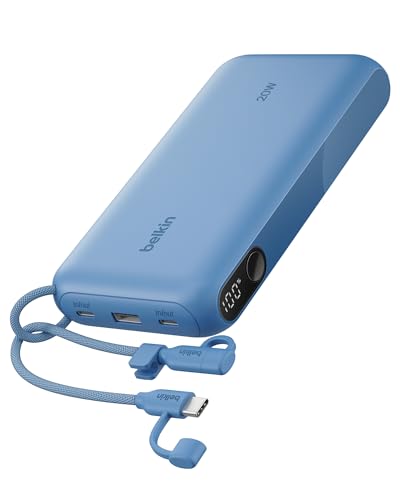
Belkin 20,000mAh 20W Power Bank. Belkin lists a digital display, 20W max on one port, 15W across three devices, 2 USB-C and 1 USB-A ports and about 0.49 pounds. It is the lightest and slowest here. See the Belkin 20,000mAh 20W Power Bank on Amazon.
How to Choose a Power Bank With a Digital Display
Display Type
TFT screens show more data, including temperature and voltage. Simple displays show only percent.
Output
A display matters most when you charge a laptop or several devices.
Weight
These banks weigh about 0.5 to 1.4 pounds in the listings.
Warranty
Large brands state 18 to 24 months. Check the others.
Airline Rules
Banks under 100Wh are allowed in carry-on baggage. See our airline rules guide.
How We Evaluate Power Banks With Digital Display
We evaluate power banks with digital display by comparing manufacturer specifications, Amazon listing information and available buyer ratings. We weigh each model on thickness and weight, capacity, the wireless and wired output the maker states, certification claims, heat management, extras such as a stand or built-in cable, warranty and safety information. Amazon does not supply ratings for these products through our data source, so the rankings rely on published specifications rather than review scores. Confirm the certification, output and thickness for the exact model before you buy. Commissions do not affect rankings.
Frequently Asked Questions
Is a display worth it?
It helps you see input and output power and the remaining charge. It matters most on high-wattage banks.
Does the display use battery?
Yes, a little. Makers do not give figures.
What is a TFT display?
A color screen that can show more data than a simple percent readout.
Can I take it on a plane?
Yes, in carry-on baggage. These banks are below 100Wh. Confirm with your airline.
Final Verdict
The CUKTECH 15 Ultra is the best overall pick for 165W total output and a TFT with temperature warnings. The Anker 737 suits buyers who want recharge estimates and a stated warranty, and the Lenovo suits people who want a long cable. All claims are the makers’ own, so confirm output and size first.
Related reading: best laptop power banks and best high capacity power banks.
About the author

The GadgetsDiary editorial team compares portable power and charging products using manufacturer specifications and Amazon listing data. Read how we choose and rank products on our How We Review and Editorial Policy pages.