
6 Best GaN Chargers of 2026
Disclosure: GadgetsDiary earns a commission from qualifying purchases made through links on this page. Commissions do not affect how products...
 By GadgetsDiary Editorial Team
Updated November 9, 2026
Disclosure: GadgetsDiary earns a commission from qualifying purchases made through links on this page. Commissions do not affect how products are ranked. See our Affiliate Disclosure and How We Review pages. Safety: Chargers connect to mains power. Use certified cables rated for the power you draw, keep the charger ventilated, and follow the manufacturer manual.
GaN chargers use gallium nitride components to deliver laptop-class power from a small wall adapter, which is why one compact block can replace a laptop charger and a phone charger. This guide compares six models from Anker, UGREEN and Baseus, from a 65W three-port charger to a 160W five-port charger, for travelers, remote workers and anyone who wants fewer chargers in the bag and less clutter at the desk.
We compared each model on total and per-port output, ports, size, plug design and the warranty or certifications the listing states, using the specifications in the Amazon listings. Browse more in our GaN Chargers category, and check your laptop’s original charger rating first, because that number tells you which output tier you need.
All Products Compared
| Product | Best For | Max Output | Ports | Size | Notable Feature |
|---|---|---|---|---|---|
| Anker Prime 100W 3-Port GaN Charger | Best overall | 100W total, 100W per USB-C | 2 USB-C, 1 USB-A | 1.71 x 1.14 x 2.67 in | 24-month warranty |
| UGREEN Nexode Pro 160W 5-Port Charger | Several laptops | 160W total, 140W on two ports | 4 USB-C, 1 USB-A | Not listed | Rotatable touch display |
| Anker 100W Max GaN Charger with Display | Display and cable | 100W on any USB-C | 2 USB-C, 1 USB-A, per the listing | 2.72 x 2.17 x 1.34 in | Cable included, smart display |
| Baseus 140W 4-Port GaN Charger | Four devices | 140W on one port | 3 USB-C, 1 USB-A | Not listed | Foldable prongs |
| Baseus 100W 3-Port Foldable Charger | Compact 100W | 100W peak | 2 USB-C, 1 USB-A | 3.2 x 1.7 x 1.7 in | PD 3.0, QC 3.0, PPS |
| UGREEN Nexode 65W 3-Port Charger | Thin laptops | 65W | 2 USB-C, 1 USB-A | Dimensions inconsistent | Foldable plug |
| Award | Product | GadgetsDiary Score About GadgetsDiary ScoreThe GadgetsDiary Score is our own rating from 0 to 10, based on performance, design and build, ease of use, and value. It reflects independent research and is never influenced by manufacturers, retailers, or affiliate commissions. Learn more › | Price | |
|---|---|---|---|---|
| Best Value |
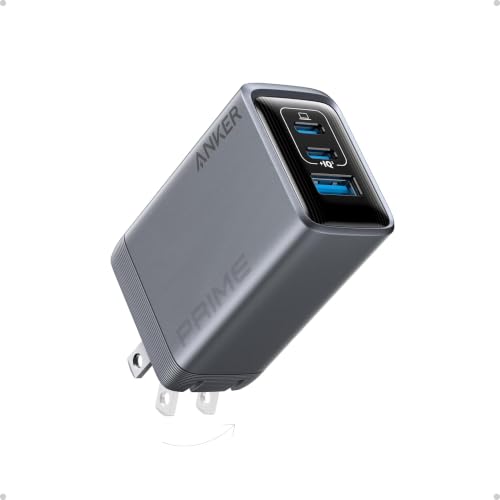 Anker Prime Charger, 100W Max 3-Port |
$59.99 | Buy | |
| Best Premium |
 UGREEN Nexode Pro Charger |
$64.99 | Buy | |
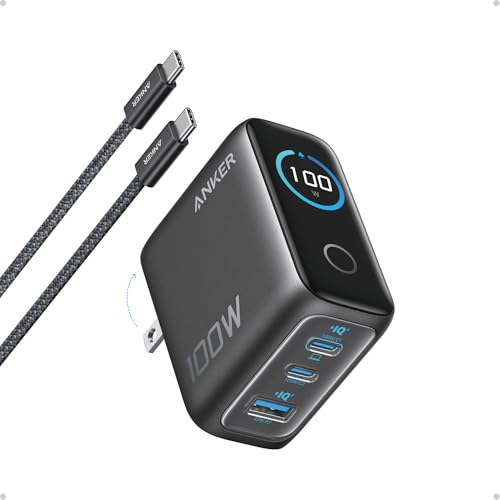 Anker 100W Max USB C Charger |
$69.99 | Buy | ||
 Baseus PD3.1 140W USB C Charger PPS Fast Charger |
$59.99 | Buy | ||
| Best Budget |
 Baseus 100W USB C Charger Block |
$49.99 | Buy | |
| Best Overall |
 UGREEN Nexode 65W USB C Charger Block |
$27.99 | Buy |
Anker Prime Charger, 100W Max 3-Port
UGREEN Nexode Pro Charger
Anker 100W Max USB C Charger
Baseus PD3.1 140W USB C Charger PPS Fast Charger
Baseus 100W USB C Charger Block
UGREEN Nexode 65W USB C Charger Block
Top 3 GaN Chargers Reviewed
#1 Anker Prime 100W 3-Port GaN Charger: Best Overall
Why We Picked It
The Anker Prime 100W 3-Port GaN Charger ranks first because it lists a full 100W on each USB-C port in a body that stays pocket-sized. The listing gives 100W total across two USB-C ports and one USB-A port, and says a 14-inch MacBook Pro reaches 50 percent in 30 minutes.
Foldable prongs and a thicker prong design are described as helping the charger stay connected and fit a bag or pocket, and the box includes a 24-month warranty. Against the Anker 100W Max, it lists no display or cable but a longer warranty. Against the UGREEN 160W, it lists lower total output in a smaller body.
Key Specifications
- Output: 100W total, 100W per USB-C port
- Ports: two USB-C, one USB-A
- Size: 1.71 x 1.14 x 2.67 inches
- Weight: 0.37 pounds
- Warranty: 24 months
| Pros | Cons |
|---|---|
|
|
Things to Consider
The 100W total is shared across ports, so charging a laptop and a phone together lowers what the laptop receives. The listing does not mention a cable, so you will need a USB-C cable rated for 100W. Check that the dimensions in the listing match the product page, and confirm the prong design suits the outlets where you travel.
Best For
Travelers and remote workers who want one compact charger for a laptop and a phone.
Skip It If
Skip it if you want a display or an included cable, or need more than 100W in total.
See the Anker Prime 100W 3-Port GaN Charger on Amazon.
#2 UGREEN Nexode Pro 160W 5-Port Charger: Best for Several Laptops
Why We Picked It
The UGREEN Nexode Pro 160W 5-Port Charger takes second place because it lists the highest total output in this guide, 160W, with up to 140W from each of two USB-C ports. It has four USB-C ports and one USB-A port, so a desk or travel kit can run several devices from one outlet.
The listing describes a rotatable touch display that shows total wattage, per-port power and the active protocol, plus foldable plug design and automatic power allocation. Against the Anker Prime 100W, it lists much higher output and more ports. Against the Baseus 140W, it lists higher total output and an extra USB-C port.
Key Specifications
- Output: 160W total
- Per port: up to 140W on two USB-C ports
- Ports: four USB-C, one USB-A
- Display: rotatable touch screen
- Design: foldable plug
| Pros | Cons |
|---|---|
|
|
Things to Consider
The listing gives no dimensions or weight, so check the product page if size matters. The 160W figure is a total, and the two 140W ports are the maximum, so the output per port drops when several ports are in use. Use cables rated for the power you draw, and expect the unit to run warm at high loads.
Best For
Desk setups and travelers who charge a laptop, a tablet and phones from one adapter.
Skip It If
Skip it if you want the smallest possible charger, since the size is not listed and it is built for high output.
See the UGREEN Nexode Pro 160W 5-Port Charger on Amazon.
#3 Anker 100W Max GaN Charger with Display: Best for Display and Cable
Why We Picked It
The Anker 100W Max GaN Charger with Display takes third place because it adds a smart display and a 4.9 foot USB-C cable to 100W output on any USB-C port. The display shows charging status, temperature and port performance in real time, according to the listing.
It measures 2.72 x 2.17 x 1.34 inches, has a foldable plug, and switches to a 95W plus 5W low-current mode when a port draws about 5W or less for a minute. The box includes an 18-month warranty. Against the Anker Prime 100W, it lists a display and cable but a shorter warranty. Against the UGREEN, it lists lower output.
Key Specifications
- Output: 100W on any USB-C port
- Ports: two USB-C, one USB-A, per the listing
- Display: real-time status and temperature
- Size and weight: 2.72 x 2.17 x 1.34 inches, 0.47 pounds
- Included: 4.9 foot USB-C cable, 18-month warranty
| Pros | Cons |
|---|---|
|
|
Things to Consider
The low-current mode is designed to protect small devices, but the listing describes it as automatic, so check the manual if you charge earbuds and a laptop together. The listing says the display shows temperature, which is a manufacturer description. The charger is larger than the Prime, so check that it fits the space you have.
Best For
Buyers who want to see what is charging and get a cable in the box.
Skip It If
Skip it if you want the smallest body or the longest warranty.
See the Anker 100W Max GaN Charger with Display on Amazon.
How to Choose a GaN Charger
Output and Port Count
Start with your laptop’s original charger rating and choose a charger that matches or exceeds it on a single port. Then look at the total output, because it is shared when several ports are used. A 65W charger suits many thin laptops, while larger laptops need more. Count the USB-C and USB-A ports you need, and check whether the top output applies to one port or to every port. Remember that total output is a limit for everything plugged in at once, so a laptop and two phones will not each receive the headline figure.
Charging Standards (USB PD, PPS, Qi, MagSafe)
USB-C Power Delivery is the standard most laptops and phones use. PPS lets some phones negotiate finer voltage steps for faster charging, and Quick Charge helps some Android phones. Standards only help when both the charger and the device support them, so read the compatibility notes in the listing and your device’s manual. Wireless standards like Qi and MagSafe apply to pads, not to wall adapters. If a listing names a protocol you do not recognize, treat it as a bonus rather than a reason to buy, and focus on the wattage and the ports you actually use every day.
Size and Plug Design
A compact body and foldable prongs save space in a bag, and a firm plug stays seated in the outlet. Listed dimensions can differ from the product page, so check them. Large multi-port chargers are heavier and may block neighboring outlets on a power strip. Think about where the charger will live, at a desk, in a bag or in a hotel room, and choose the shape that fits. Folding prongs also protect other items in a bag from scratches.
Compatibility With Your Devices
A charger can only deliver what your device accepts. Check the wattage your laptop, tablet and phone accept, and use a cable rated for that power. Many cables are limited to a lower rating, which slows charging or stops a laptop from charging at all. The listing examples name common devices, but they do not guarantee that yours will charge at the headline speed. When in doubt, check the manual of the device and the charger for the accepted wattage.
Safety Certifications
Look for protection against overheating, overvoltage, overcurrent and short circuits, and for certifications named in the listing. Treat those as manufacturer statements and verify them on the product page. Use the charger in a ventilated spot, keep it away from water, and stop using it if it becomes very hot or damaged. Buy chargers with clear brand support rather than unbranded units, and follow the manual, including its guidance on heat. For on-the-go power, see our Power Banks.
How We Evaluate GaN Chargers
We evaluate GaN chargers by comparing manufacturer specifications, Amazon listing information and available buyer ratings. We weigh each model on fit for laptop and phone charging, total and per-port output, ports, size, plug design, charging standards, safety information, warranty and value. Amazon does not supply ratings for these products through our data source, so the rankings rely on published specifications rather than review scores. Listings can be inconsistent, so confirm output, port types and compatibility for the exact model before you buy. Commissions do not affect rankings, and we update the guide when listings change.
Frequently Asked Questions
Can a GaN charger charge a laptop?
Yes, if its output matches your laptop’s charger and you use a cable rated for that power. The Anker Prime 100W 3-Port GaN Charger lists 100W on each USB-C port, which suits many laptops. Check your laptop’s original rating before buying.
Is GaN safer than a standard charger?
GaN is a component technology that allows smaller, more efficient chargers. Safety still depends on the design and protections. Look for the protections and certifications in the listing, verify them on the product page, and use the supplied cables and the manual’s guidance.
Can I charge several devices at once?
Yes, but the output is shared. The UGREEN Nexode Pro 160W 5-Port Charger lists 160W in total with up to 140W on two ports, so a laptop on one port leaves less for the others. Check the per-port figures in the manual before you plan a full desk.
Do I need a special cable?
Often yes. Higher power needs a cable rated for it, and a weak cable can slow charging or stop a laptop from charging. The Anker 100W Max GaN Charger with Display includes a 4.9 foot USB-C cable. For other models, use a cable the manufacturer recommends.
Will it work abroad?
The listings reviewed here do not state worldwide voltage support. Check the input voltage range in the manual before using a charger abroad, and use a plug adapter rather than forcing a connection, and never use a damaged plug.
Final Verdict
The Anker Prime 100W 3-Port GaN Charger is the strongest overall option in this guide because it lists 100W on each USB-C port in a compact foldable body with a 24-month warranty. If you charge several laptops or want a display, the UGREEN Nexode Pro 160W 5-Port Charger is the alternative to consider. Whichever you choose, match the output to your laptop, use a cable rated for the power, and confirm the specifications on the product page before you buy. A charger that fits your laptop’s rating and your travel habits matters more than the biggest number on the box.
About the author

The GadgetsDiary editorial team compares portable power and charging products using manufacturer specifications and Amazon listing data. Read how we choose and rank products on our How We Review and Editorial Policy pages.